| 1 | <div align="center"> |
| 2 | <h1 align="center">MoneyPrinterTurbo 💸</h1> |
| 3 | |
| 4 | <p align="center"> |
| 5 | <a href="https://github.com/harry0703/MoneyPrinterTurbo/stargazers"><img src="https://img.shields.io/github/stars/harry0703/MoneyPrinterTurbo.svg?style=for-the-badge" alt="Stargazers"></a> |
| 6 | <a href="https://github.com/harry0703/MoneyPrinterTurbo/issues"><img src="https://img.shields.io/github/issues/harry0703/MoneyPrinterTurbo.svg?style=for-the-badge" alt="Issues"></a> |
| 7 | <a href="https://github.com/harry0703/MoneyPrinterTurbo/network/members"><img src="https://img.shields.io/github/forks/harry0703/MoneyPrinterTurbo.svg?style=for-the-badge" alt="Forks"></a> |
| 8 | <a href="https://github.com/harry0703/MoneyPrinterTurbo/blob/main/LICENSE"><img src="https://img.shields.io/github/license/harry0703/MoneyPrinterTurbo.svg?style=for-the-badge" alt="License"></a> |
| 9 | </p> |
| 10 | <br> |
| 11 | <h3>简体中文 | <a href="README-en.md">English</a> | <a href="README-ar.md">العربية</a></h3> |
| 12 | <div align="center"> |
| 13 | <a href="https://trendshift.io/repositories/8731" target="_blank"><img src="https://trendshift.io/api/badge/repositories/8731" alt="harry0703%2FMoneyPrinterTurbo | Trendshift" style="width: 250px; height: 55px;" width="250" height="55"/></a> |
| 14 | </div> |
| 15 | |
| 16 | <br> |
| 17 | 只需提供一个视频 <b>主题</b> 或 <b>关键词</b> ,就可以全自动生成视频文案、视频素材、视频字幕、视频背景音乐,然后合成一个高清的短视频。 |
| 18 | <br> |
| 19 | |
| 20 | <h4>Web界面</h4> |
| 21 | |
| 22 |  |
| 23 | |
| 24 | <h4>API界面</h4> |
| 25 | |
| 26 |  |
| 27 | |
| 28 | </div> |
| 29 | |
| 30 | ## 特别感谢 🙏 |
| 31 | |
| 32 | <table align="center"> |
| 33 | <tr> |
| 34 | <td align="center" width="160"> |
| 35 | <a href="https://aihubmix.com/?aff=CEve"><strong>AIHubMix</strong></a> |
| 36 | </td> |
| 37 | <td align="left"> |
| 38 | <sub>感谢 <a href="https://aihubmix.com/?aff=CEve">AIHubMix</a> 对本项目的赞助。AIHubMix 深度适配 OpenAI、Claude、Gemini、DeepSeek、智谱、千问等全球顶级最新模型,一站式快速接入 GPT-5.5、deepseek-v4-flash 等 700+ 模型(含多个免费模型),提供企业级生产稳定性保障。</sub> |
| 39 | </td> |
| 40 | </tr> |
| 41 | |
| 42 | <tr> |
| 43 | <td align="center" width="160"> |
| 44 | <a href="https://www.volcengine.com/activity/ai618?utm_campaign=hw&utm_content=hw&utm_medium=devrel_tool_web&utm_source=OWO&utm_term=MoneyPrinterTurbo"><img src="docs/sponsors/volcengine-logo.svg" alt="火山引擎" height="32"></a><br> |
| 45 | <a href="https://www.volcengine.com/activity/ai618?utm_campaign=hw&utm_content=hw&utm_medium=devrel_tool_web&utm_source=OWO&utm_term=MoneyPrinterTurbo"><strong>火山引擎</strong></a> |
| 46 | </td> |
| 47 | <td align="left"> |
| 48 | <sub>感谢 <a href="https://www.volcengine.com/activity/ai618?utm_campaign=hw&utm_content=hw&utm_medium=devrel_tool_web&utm_source=OWO&utm_term=MoneyPrinterTurbo">火山引擎</a> 赞助了本项目!方舟 Agent Plan 模型订阅套餐集成了包含 Doubao-Seed、Doubao-Seedance、Doubao-Seedream 等在内的字节跳动自研 SOTA 级模型,覆盖文本、代码、图像、视频等多模态任务。最新支持 MiniMax-M3、DeepSeek-V4 系列、GLM-5.2、Doubao-Seed-2.0 系列、Kimi-K2.7 等模型,工具不限。超全模态模型与 Harness 升级一步到位,深度支持 Agent 框架与 AI 编程工具。一次订阅,可以为不同任务切换合适的 AI 引擎。方舟 Agent Plan 限时 2.5 折订阅,<a href="https://www.volcengine.com/activity/ai618?utm_campaign=hw&utm_content=hw&utm_medium=devrel_tool_web&utm_source=OWO&utm_term=MoneyPrinterTurbo">点击链接抢购</a>,名额有限,先到先得。</sub> |
| 49 | </td> |
| 50 | </tr> |
| 51 | <tr> |
| 52 | <td align="center" width="160"> |
| 53 | <a href="https://www.ccsub.net/register?ref=VCVDAWWY"><img src="docs/sponsors/ccsub-logo.png" alt="CCSub" height="36"></a><br> |
| 54 | <a href="https://www.ccsub.net/register?ref=VCVDAWWY"><strong>CCSub</strong></a> |
| 55 | </td> |
| 56 | <td align="left"> |
| 57 | <sub>感谢 <a href="https://www.ccsub.net/register?ref=VCVDAWWY">CCSub</a> 赞助本项目!CCSub 是稳定、实惠的 AI API 中转平台,是 Claude Code 官方订阅的超强平替。一个 API Key 即可调用 Claude Opus 4.8、Sonnet 4.6、Haiku 4.5、GPT-5、Gemini 等模型,价格约为官方直连的 1/3,全球直连无需梯子。兼容 Claude Code、Codex、Cursor、Cline、Continue、Windsurf 等所有主流 AI 编程工具。前往 <a href="https://www.ccsub.net/register?ref=VCVDAWWY">www.ccsub.net</a> 注册即送 $5 体验额度。</sub> |
| 58 | </td> |
| 59 | </tr> |
| 60 | <tr> |
| 61 | <td align="center" width="160"> |
| 62 | <a href="https://www.compshare.cn/coding-plan?ytag=GPU_YY-git_MoneyPrinterTu"><img src="docs/sponsors/compshare-logo.png" alt="优云智算" height="34"></a><br> |
| 63 | <a href="https://www.compshare.cn/coding-plan?ytag=GPU_YY-git_MoneyPrinterTu"><strong>优云智算</strong></a> |
| 64 | </td> |
| 65 | <td align="left"> |
| 66 | <sub>感谢 <a href="https://www.compshare.cn/coding-plan?ytag=GPU_YY-git_MoneyPrinterTu">优云智算</a> 赞助本项目!优云智算是 UCloud 旗下 AI 云平台,一站式提供国内外主流模型的 API 服务,一个 Key 即可调用所有模型。主打高性价比国产模型 CodingPlan 套餐(GLM5.2、Deepseek-v4等),同时提供官方转发的稳定海外模型通道,满足多场景开发需求。已兼容 Claude Code、Codex 等主流 AI 编程工具及通用 API 调用,支持企业级高并发、7×24 技术支持和自助开票。<a href="https://www.compshare.cn/coding-plan?ytag=GPU_YY-git_MoneyPrinterTu">点击注册</a>,最高可获得 ¥10 免费体验金。</sub> |
| 67 | </td> |
| 68 | </tr> |
| 69 | <tr> |
| 70 | <td align="center" width="160"> |
| 71 | <a href="https://reccloud.cn"><img src="docs/sponsors/reccloud-logo.svg" alt="录咖" height="36"></a><br> |
| 72 | <a href="https://reccloud.cn"><strong>录咖 AI</strong></a> |
| 73 | </td> |
| 74 | <td align="left"> |
| 75 | <sub>由于该项目的 <strong>部署</strong> 和 <strong>使用</strong>,对于一些小白用户来说,还是 <strong>有一定的门槛</strong>,在此特别感谢 <a href="https://reccloud.cn">录咖(AI智能 多媒体服务平台)</a> 网站基于该项目,提供的免费 <code>AI视频生成器</code> 服务,可以不用部署,直接在线使用,非常方便。</sub> |
| 76 | </td> |
| 77 | </tr> |
| 78 | <tr> |
| 79 | <td align="center" width="160"> |
| 80 | <a href="https://picwish.cn"><img src="docs/sponsors/picwish-logo.svg" alt="佐糖" height="36"></a><br> |
| 81 | <a href="https://picwish.cn"><strong>佐糖</strong></a> |
| 82 | </td> |
| 83 | <td align="left"> |
| 84 | <sub>感谢 <a href="https://picwish.cn">佐糖</a> 对该项目的支持和赞助,使得该项目能够持续的更新和维护。佐糖专注于<strong>图像处理领域</strong>,提供丰富的<strong>图像处理工具</strong>,将复杂操作极致简化,真正实现让图像处理更简单。</sub> |
| 85 | </td> |
| 86 | </tr> |
| 87 | </table> |
| 88 | |
| 89 | ## 功能特性 🎯 |
| 90 | |
| 91 | - [x] 完整的 **MVC架构**,代码 **结构清晰**,易于维护,支持 `API` 和 `Web界面` |
| 92 | - [x] 支持视频文案 **AI自动生成**,也可以**自定义文案** |
| 93 | - [x] 支持多种 **高清视频** 尺寸 |
| 94 | - [x] 竖屏 9:16,`1080x1920` |
| 95 | - [x] 横屏 16:9,`1920x1080` |
| 96 | - [x] 支持 **批量视频生成**,可以一次生成多个视频,然后选择一个最满意的 |
| 97 | - [x] 支持 **视频片段时长** 设置,方便调节素材切换频率 |
| 98 | - [x] 支持 **中文** 和 **英文** 视频文案 |
| 99 | - [x] 支持 **多种语音** 合成,可 **实时试听** 效果 |
| 100 | - [x] 支持 **字幕生成**,可以调整 `字体`、`位置`、`颜色`、`大小`,同时支持`字幕描边`设置 |
| 101 | - [x] 支持 **背景音乐**,随机或者指定音乐文件,可设置`背景音乐音量` |
| 102 | - [x] 视频素材来源 **高清**,而且 **无版权**,也可以使用自己的 **本地素材** |
| 103 | - [x] 支持多种素材源:**Pexels**、**Pixabay**、**Coverr** |
| 104 | - [x] 可选接入 **TwelveLabs** 视频 AI:用 **Marengo** 多模态向量按主题语义重排素材关键词,用 **Pegasus** 对素材做内容 QA/描述([TwelveLabs API key](https://twelvelabs.io)) |
| 105 | - [x] 支持 **OpenAI**、**AIHubMix**、**AIML API**、**EvoLink**、**Moonshot**、**Azure**、**gpt4free**、**one-api**、**通义千问**、**Google Gemini**、**Ollama**、**DeepSeek**、**MiniMax**、 **文心一言**, **Pollinations**、**ModelScope** 等多种模型接入 |
| 106 | - [x] 支持一键 **跨平台发布**,生成完成后自动上传至 **TikTok**、**Instagram** 和 **YouTube Shorts**(需 [Upload-Post](https://upload-post.com) 账号;YouTube 发布时自动标注 AI 生成内容);在 `config.toml` 中配置 `upload_post_platforms`、`upload_post_youtube_privacy_status` 等参数 |
| 107 | |
| 108 | ## 视频演示 📺 |
| 109 | |
| 110 | ### 竖屏 9:16 |
| 111 | |
| 112 | <table> |
| 113 | <thead> |
| 114 | <tr> |
| 115 | <th align="center"><g-emoji class="g-emoji" alias="arrow_forward">▶️</g-emoji> 《如何增加生活的乐趣》</th> |
| 116 | <th align="center"><g-emoji class="g-emoji" alias="arrow_forward">▶️</g-emoji> 《金钱的作用》<br>更真实的合成声音</th> |
| 117 | <th align="center"><g-emoji class="g-emoji" alias="arrow_forward">▶️</g-emoji> 《生命的意义是什么》</th> |
| 118 | </tr> |
| 119 | </thead> |
| 120 | <tbody> |
| 121 | <tr> |
| 122 | <td align="center"><video src="https://github.com/harry0703/MoneyPrinterTurbo/assets/4928832/a84d33d5-27a2-4aba-8fd0-9fb2bd91c6a6"></video></td> |
| 123 | <td align="center"><video src="https://github.com/harry0703/MoneyPrinterTurbo/assets/4928832/af2f3b0b-002e-49fe-b161-18ba91c055e8"></video></td> |
| 124 | <td align="center"><video src="https://github.com/harry0703/MoneyPrinterTurbo/assets/4928832/112c9564-d52b-4472-99ad-970b75f66476"></video></td> |
| 125 | </tr> |
| 126 | </tbody> |
| 127 | </table> |
| 128 | |
| 129 | ### 横屏 16:9 |
| 130 | |
| 131 | <table> |
| 132 | <thead> |
| 133 | <tr> |
| 134 | <th align="center"><g-emoji class="g-emoji" alias="arrow_forward">▶️</g-emoji>《生命的意义是什么》</th> |
| 135 | <th align="center"><g-emoji class="g-emoji" alias="arrow_forward">▶️</g-emoji>《为什么要运动》</th> |
| 136 | </tr> |
| 137 | </thead> |
| 138 | <tbody> |
| 139 | <tr> |
| 140 | <td align="center"><video src="https://github.com/harry0703/MoneyPrinterTurbo/assets/4928832/346ebb15-c55f-47a9-a653-114f08bb8073"></video></td> |
| 141 | <td align="center"><video src="https://github.com/harry0703/MoneyPrinterTurbo/assets/4928832/271f2fae-8283-44a0-8aa0-0ed8f9a6fa87"></video></td> |
| 142 | </tr> |
| 143 | </tbody> |
| 144 | </table> |
| 145 | |
| 146 | ## 配置要求 📦 |
| 147 | |
| 148 | - 建议系统:Windows 10 或 MacOS 11.0 以上,或主流 Linux 发行版 |
| 149 | - GPU 不是必需项,但如果你希望本地转录、更快的视频处理或更顺畅的批量生成体验,建议使用带显存的独立显卡 |
| 150 | |
| 151 | | 项目 | 最低配置 | 推荐配置 | 理想配置 | |
| 152 | | ---- | -------- | --------------- | --------------- | |
| 153 | | CPU | 4 核 | 6 到 8 核 | 8 核及以上 | |
| 154 | | RAM | 4 GB | 8 GB | 16 GB 及以上 | |
| 155 | | GPU | 非必须 | 4 GB 显存及以上 | 8 GB 显存及以上 | |
| 156 | |
| 157 | - 如果你主要依赖云端 LLM、云端 TTS 和在线素材源,CPU 与内存比 GPU 更重要 |
| 158 | - 如果你启用 `faster-whisper`、批量生成或更重的本地处理链路,GPU 会明显提升速度 |
| 159 | |
| 160 | ## 快速开始 🚀 |
| 161 | |
| 162 | ### 推荐使用方式 |
| 163 | |
| 164 | - Windows 用户:优先使用一键启动包,适合快速体验 |
| 165 | - MacOS / Linux 用户:优先使用 `uv sync --frozen` 进行本地部署 |
| 166 | - 想要隔离运行环境:优先使用 Docker 部署 |
| 167 | |
| 168 | ### 在 Google Colab 中运行 |
| 169 | |
| 170 | 免去本地环境配置,点击直接在 Google Colab 中快速体验 MoneyPrinterTurbo |
| 171 | |
| 172 | [](https://colab.research.google.com/github/harry0703/MoneyPrinterTurbo/blob/main/docs/MoneyPrinterTurbo.ipynb) |
| 173 | |
| 174 | ### Windows一键启动包 |
| 175 | |
| 176 | 下载一键启动包,解压直接使用(路径不要有 **中文**、**特殊字符**、**空格**) |
| 177 | |
| 178 | - GitHub Release: https://github.com/harry0703/MoneyPrinterTurbo/releases/latest |
| 179 | |
| 180 | 下载后,建议先**双击执行** `update.bat` 更新到**最新代码**,然后双击 `start.bat` 启动 |
| 181 | |
| 182 | 启动后,会自动打开浏览器(如果打开是空白,建议换成 **Chrome** 或者 **Edge** 打开) |
| 183 | |
| 184 | ## 安装部署 📥 |
| 185 | |
| 186 | ### 前提条件 |
| 187 | |
| 188 | - 尽量不要使用 **中文路径**,避免出现一些无法预料的问题 |
| 189 | - 请确保你的 **网络** 是正常的,VPN需要打开`全局流量`模式 |
| 190 | |
| 191 | #### ① 克隆代码 |
| 192 | |
| 193 | ```shell |
| 194 | git clone https://github.com/harry0703/MoneyPrinterTurbo.git |
| 195 | ``` |
| 196 | |
| 197 | #### ② 修改配置文件(可选,建议启动后也可以在 WebUI 里面配置) |
| 198 | |
| 199 | - 将 `config.example.toml` 文件复制一份,命名为 `config.toml` |
| 200 | - 按照 `config.toml` 文件中的说明,配置好 `pexels_api_keys` 和 `llm_provider`,并根据 llm_provider 对应的服务商,配置相关的 |
| 201 | API Key |
| 202 | - 如果希望使用推荐的大模型平台,也可以将 `llm_provider` 设置为 `aihubmix`,并填写对应的 API Key。 |
| 203 | |
| 204 | ### Docker部署 🐳 |
| 205 | |
| 206 | #### ① 启动Docker |
| 207 | |
| 208 | 如果未安装 Docker,请先安装 https://www.docker.com/products/docker-desktop/ |
| 209 | |
| 210 | 如果是Windows系统,请参考微软的文档: |
| 211 | |
| 212 | 1. https://learn.microsoft.com/zh-cn/windows/wsl/install |
| 213 | 2. https://learn.microsoft.com/zh-cn/windows/wsl/tutorials/wsl-containers |
| 214 | |
| 215 | ```shell |
| 216 | cd MoneyPrinterTurbo |
| 217 | docker compose -f docker-compose.release.yml up |
| 218 | ``` |
| 219 | |
| 220 | > 默认推荐使用 `docker-compose.release.yml`,它会直接拉取 GitHub Container Registry 上的预构建镜像:`ghcr.io/harry0703/moneyprinterturbo:latest`。 |
| 221 | > 如果你需要本地重新构建镜像,可以继续使用 `docker compose up`。 |
| 222 | > 注意:首次启动前请确保项目根目录下存在 `config.toml`,可以从 `config.example.toml` 复制一份。 |
| 223 | |
| 224 | #### ② 访问Web界面 |
| 225 | |
| 226 | 打开浏览器,访问 http://127.0.0.1:8501 |
| 227 | |
| 228 | #### ③ 访问API文档 |
| 229 | |
| 230 | 打开浏览器,访问 http://127.0.0.1:8080/docs 或者 http://127.0.0.1:8080/redoc |
| 231 | |
| 232 | ### 手动部署 📦 |
| 233 | |
| 234 | > 视频教程 |
| 235 | |
| 236 | - 完整的使用演示:https://v.douyin.com/iFhnwsKY/ |
| 237 | - 如何在Windows上部署:https://v.douyin.com/iFyjoW3M |
| 238 | |
| 239 | #### ① 创建虚拟环境 |
| 240 | |
| 241 | 推荐使用 [uv](https://docs.astral.sh/uv/) 管理 Python 环境和依赖,默认使用 Python `3.11` |
| 242 | |
| 243 | ```shell |
| 244 | git clone https://github.com/harry0703/MoneyPrinterTurbo.git |
| 245 | cd MoneyPrinterTurbo |
| 246 | uv python install 3.11 |
| 247 | uv sync --frozen |
| 248 | ``` |
| 249 | |
| 250 | 如果你暂时不使用 `uv`,也可以继续使用 `venv + pip` |
| 251 | |
| 252 | ```shell |
| 253 | python3.11 -m venv .venv |
| 254 | source .venv/bin/activate |
| 255 | pip install -r requirements.txt |
| 256 | ``` |
| 257 | |
| 258 | 说明: |
| 259 | |
| 260 | - `pyproject.toml` 是主依赖定义文件 |
| 261 | - `uv.lock` 是锁文件,建议默认执行 `uv sync --frozen` |
| 262 | - `requirements.txt` 仅保留给旧的 `pip` 安装方式兼容使用 |
| 263 | |
| 264 | #### ② 启动Web界面 🌐 |
| 265 | |
| 266 | 注意需要到 MoneyPrinterTurbo 项目 `根目录` 下执行以下命令 |
| 267 | |
| 268 | ###### Windows |
| 269 | |
| 270 | ```powershell |
| 271 | .\webui.bat |
| 272 | ``` |
| 273 | |
| 274 | 在 CMD 中也可以执行 `webui.bat`。 |
| 275 | `webui.bat` 会优先使用项目 `.venv` 或一键包内置 Python;如果没有找到项目 Python,但已安装 `uv`,会自动切换为 `uv run streamlit`。 |
| 276 | 如需允许局域网内其他设备访问 WebUI,可以先执行 `set MPT_WEBUI_HOST=0.0.0.0`,再运行 `webui.bat`。 |
| 277 | |
| 278 | ###### MacOS or Linux |
| 279 | |
| 280 | ```shell |
| 281 | uv run streamlit run ./webui/Main.py --browser.gatherUsageStats=False --server.showEmailPrompt=False |
| 282 | ``` |
| 283 | |
| 284 | 如果你已经手动激活了虚拟环境,也可以直接执行: |
| 285 | |
| 286 | ```shell |
| 287 | sh webui.sh |
| 288 | ``` |
| 289 | |
| 290 | 启动后,会自动打开浏览器(如果打开是空白,建议换成 **Chrome** 或者 **Edge** 打开) |
| 291 | |
| 292 | #### ③ 启动API服务 🚀 |
| 293 | |
| 294 | ```shell |
| 295 | uv run python main.py |
| 296 | ``` |
| 297 | |
| 298 | 如果你已经手动激活了虚拟环境,也可以直接执行: |
| 299 | |
| 300 | ```shell |
| 301 | python main.py |
| 302 | ``` |
| 303 | |
| 304 | #### ④ 纯命令行方式(无浏览器)⌨️ |
| 305 | |
| 306 | 如果你无法使用浏览器或端口转发,可以直接在命令行生成视频: |
| 307 | |
| 308 | ```shell |
| 309 | uv run python cli.py --video-subject "金钱的作用" |
| 310 | ``` |
| 311 | |
| 312 | 也可以指定本地素材并仅运行到某个阶段: |
| 313 | |
| 314 | ```shell |
| 315 | uv run python cli.py \ |
| 316 | --video-subject "金钱的作用" \ |
| 317 | --video-source local \ |
| 318 | --video-materials "1.mp4,2.mp4" \ |
| 319 | --stop-at video |
| 320 | ``` |
| 321 | |
| 322 | ## 语音合成 🗣 |
| 323 | |
| 324 | 所有支持的声音列表,可以查看:[声音列表](./docs/voice-list.txt) |
| 325 | |
| 326 | 默认 TTS 服务是 **Edge TTS**(免费,不需要 API Key)。在 WebUI 中它显示为 **“Azure TTS V1”**,两者指的是同一个免费服务。你可以在 `config.toml` 中设置 `voice_name`,也可以直接在 WebUI 的声音下拉框中选择。 |
| 327 | |
| 328 | > **说明:** WebUI 中的 “Azure TTS V1”(Edge TTS,免费)和 “Azure TTS V2”(付费 Azure Speech SDK)是两个不同选项,只有 V2 需要配置 Azure API Key。 |
| 329 | |
| 330 | 如果你希望使用质量更高的 **Azure TTS V2** 声音,需要在 `config.toml` 中配置 Azure Speech 凭据: |
| 331 | |
| 332 | ```toml |
| 333 | [azure] |
| 334 | speech_key = "your-azure-speech-key" |
| 335 | speech_region = "eastus" |
| 336 | ``` |
| 337 | |
| 338 | Azure TTS V2 需要开通 [Azure Speech Services](https://portal.azure.com/) 订阅。v1.1.2 新增的 9 种 Azure 声音整体会比 Edge TTS 更自然。 |
| 339 | |
| 340 | ## 字幕生成 📜 |
| 341 | |
| 342 | 当前支持2种字幕生成方式: |
| 343 | |
| 344 | - **edge**: 使用 Edge TTS 返回的时间戳对齐字幕。速度快,不需要 GPU,普通机器也可以运行;但复杂句子的时间戳偶尔可能不够准确。 |
| 345 | - **whisper**: 使用本地 `faster-whisper` 转写生成后的音频,并生成更细粒度的时间戳。速度较慢(CPU 上通常需要几秒到约 1 分钟,取决于模型大小),需要下载模型(`large-v3-turbo` 约 250 MB,`large-v3` 约 3 GB),但不依赖 TTS provider 的时间戳,字幕准确性通常更好。 |
| 346 | |
| 347 | 可以修改 `config.toml` 配置文件中的 `subtitle_provider` 进行切换 |
| 348 | |
| 349 | 建议使用 `edge` 模式,如果生成的字幕质量不好,再切换到 `whisper` 模式 |
| 350 | |
| 351 | > 注意: |
| 352 | |
| 353 | 1. whisper 模式下需要到 HuggingFace 下载一个模型文件,大约 3GB 左右,请确保网络通畅 |
| 354 | 2. 如果留空,表示不生成字幕。 |
| 355 | |
| 356 | > 由于国内无法访问 HuggingFace,可以使用以下方法下载 `whisper-large-v3` 的模型文件 |
| 357 | |
| 358 | 下载地址: |
| 359 | |
| 360 | - 百度网盘: https://pan.baidu.com/s/11h3Q6tsDtjQKTjUu3sc5cA?pwd=xjs9 |
| 361 | - 夸克网盘:https://pan.quark.cn/s/3ee3d991d64b |
| 362 | |
| 363 | 模型下载后解压,整个目录放到 `.\MoneyPrinterTurbo\models` 里面, |
| 364 | 最终的文件路径应该是这样: `.\MoneyPrinterTurbo\models\whisper-large-v3` |
| 365 | |
| 366 | ``` |
| 367 | MoneyPrinterTurbo |
| 368 | ├─models |
| 369 | │ └─whisper-large-v3 |
| 370 | │ config.json |
| 371 | │ model.bin |
| 372 | │ preprocessor_config.json |
| 373 | │ tokenizer.json |
| 374 | │ vocabulary.json |
| 375 | ``` |
| 376 | |
| 377 | ## 背景音乐 🎵 |
| 378 | |
| 379 | 用于视频的背景音乐,位于项目的 `resource/songs` 目录下。 |
| 380 | |
| 381 | > 当前项目里面放了一些默认的音乐,来自于 YouTube 视频,如有侵权,请删除。 |
| 382 | |
| 383 | ## 字幕字体 🅰 |
| 384 | |
| 385 | 用于视频字幕的渲染,位于项目的 `resource/fonts` 目录下,你也可以放进去自己的字体。 |
| 386 | |
| 387 | ## 常见问题 🤔 |
| 388 | |
| 389 | ### ❓RuntimeError: No ffmpeg exe could be found |
| 390 | |
| 391 | 通常情况下,ffmpeg 会被自动下载,并且会被自动检测到。 |
| 392 | 但是如果你的环境有问题,无法自动下载,可能会遇到如下错误: |
| 393 | |
| 394 | ``` |
| 395 | RuntimeError: No ffmpeg exe could be found. |
| 396 | Install ffmpeg on your system, or set the IMAGEIO_FFMPEG_EXE environment variable. |
| 397 | ``` |
| 398 | |
| 399 | 此时你可以从 https://www.gyan.dev/ffmpeg/builds/ 下载ffmpeg,解压后,设置 `ffmpeg_path` 为你的实际安装路径即可。 |
| 400 | |
| 401 | ```toml |
| 402 | [app] |
| 403 | # 请根据你的实际路径设置,注意 Windows 路径分隔符为 \\ |
| 404 | ffmpeg_path = "C:\\Users\\harry\\Downloads\\ffmpeg.exe" |
| 405 | ``` |
| 406 | |
| 407 | ### ❓ImageMagick 相关错误 |
| 408 | |
| 409 | > **当前版本已经不需要 ImageMagick。** |
| 410 | > |
| 411 | > 项目升级到 **MoviePy 2.x** 后,字幕渲染已经改为使用 **Pillow**,不再依赖 ImageMagick。如果你仍然看到 ImageMagick 相关错误,通常说明运行的是旧版本代码。请先执行 `git pull` 更新代码,Windows 用户也可以运行 `update.bat` 更新。 |
| 412 | |
| 413 | ### ❓OSError: [Errno 24] Too many open files |
| 414 | |
| 415 | 这个问题是由于系统打开文件数限制导致的,可以通过修改系统的文件打开数限制来解决。 |
| 416 | |
| 417 | 查看当前限制 |
| 418 | |
| 419 | ```shell |
| 420 | ulimit -n |
| 421 | ``` |
| 422 | |
| 423 | 如果过低,可以调高一些,比如 |
| 424 | |
| 425 | ```shell |
| 426 | ulimit -n 10240 |
| 427 | ``` |
| 428 | |
| 429 | ### ❓Whisper 模型下载失败,出现如下错误 |
| 430 | |
| 431 | ``` |
| 432 | LocalEntryNotFoundError: Cannot find an appropriate cached snapshot folder for the specified revision on the local disk and |
| 433 | outgoing traffic has been disabled. |
| 434 | To enable repo look-ups and downloads online, pass 'local_files_only=False' as input. |
| 435 | ``` |
| 436 | |
| 437 | 或者 |
| 438 | |
| 439 | ``` |
| 440 | An error occurred while synchronizing the model Systran/faster-whisper-large-v3 from the Hugging Face Hub: |
| 441 | An error happened while trying to locate the files on the Hub and we cannot find the appropriate snapshot folder for the |
| 442 | specified revision on the local disk. Please check your internet connection and try again. |
| 443 | Trying to load the model directly from the local cache, if it exists. |
| 444 | ``` |
| 445 | |
| 446 | 解决方法:[点击查看如何从网盘手动下载模型](#%E5%AD%97%E5%B9%95%E7%94%9F%E6%88%90-) |
| 447 | |
| 448 | ## 反馈建议 📢 |
| 449 | |
| 450 | - 可以提交 [issue](https://github.com/harry0703/MoneyPrinterTurbo/issues) |
| 451 | 或者 [pull request](https://github.com/harry0703/MoneyPrinterTurbo/pulls)。 |
| 452 | |
| 453 | ## 许可证 📝 |
| 454 | |
| 455 | 点击查看 [`LICENSE`](LICENSE) 文件 |
| 456 | |
| 457 | ## Star History |
| 458 | |
| 459 | [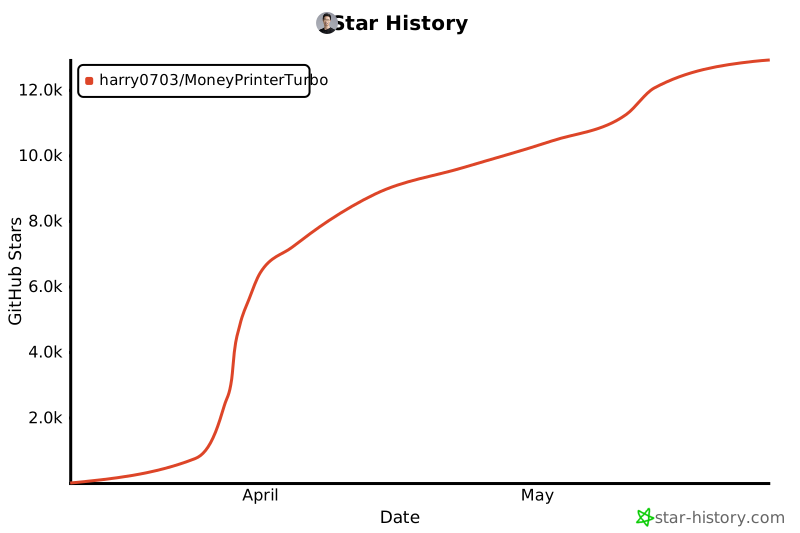](https://star-history.com/#harry0703/MoneyPrinterTurbo&Date) |
| 460 |